Showing posts with label AAC Devices. Show all posts

Wednesday, January 1, 2025

Wireless Attendant Call Transmitter- Switch Adapted


Wireless transmitter to be used with our Wireless Attendant Call systems. By default, it comes adapted to accept a standard 3.5mm switch (not included). If you do not need switch adaptation, check the box below and we will not adapt it. Multiple transmitters can be assigned to one receiver. When more than one transmitter is used with a receiver, they can be set to play the same chime, or can be set so each transmitter sends a different chime.

For individuals with mobility challenges or disabilities, effective communication and safety are top priorities. The Wireless Attendant Call Transmitter – Switch Adapted is a revolutionary solution designed to provide seamless accessibility and empower users to call for assistance effortlessly.

What is a Wireless Attendant Call Transmitter?

A Wireless Attendant Call Transmitter is a device that allows users to send alerts or signals to caregivers or attendants at the press of a button. When paired with a switch-adapted setup, the device becomes even more versatile, enabling individuals who rely on assistive switches to easily activate the transmitter.

This innovative tool is perfect for homes, healthcare facilities, and educational settings, ensuring safety and independence for those with unique communication needs.

Customizable Switch Integration

The device is compatible with various adaptive switches, making it ideal for users with specific motor skill limitations.

Wireless Convenience

No tangled cords or restrictive setups – this transmitter communicates wirelessly with receivers, offering flexibility in any environment.

Clear and Instant Alerts

The transmitter sends clear, immediate signals to a designated receiver, ensuring prompt assistance when needed.

Portable and Lightweight

Easy to carry or mount, the transmitter can adapt to various user needs and settings.

Benefits of Using a Wireless Attendant Call Transmitter

Enhanced Independence

Users can independently request help without relying on constant supervision. This fosters confidence and autonomy.

Improved Safety

In emergencies or daily routines, the transmitter ensures users can quickly alert caregivers, reducing response time.

Versatility Across Settings

Whether at home, in a classroom, or a care facility, this device adapts to different environments and requirements.

Inclusive Design

By being switch-adapted, the transmitter caters to a wide range of physical and cognitive abilities.

The Wireless Attendant Call Transmitter – Switch Adapted is more than just a device; it’s a lifeline for individuals seeking independence and safety. Whether you’re a caregiver or someone with unique accessibility needs, this tool provides peace of mind and practical support.

Explore this and other assistive solutions today on our website. Empower yourself or your loved ones with the tools to lead a safer and more independent life.

For more information about Wireless Call Button and Assistive Technology Products visit here Adaptive Tech Solutions

Wednesday, September 11, 2024

A Guide to Choosing the Best Switch-Adapted Wireless Speakers for Assistive Technology


Wireless Suction Speaker

People with disabilities can jam out and watch movies with our Wireless Switch Adapted Suction Speaker! Our wireless Bluetooth speaker has been adapted to accept up to two standard 3.5mm switches. (Switches sold separately.) The suction speaker pairs wirelessly with Bluetooth  3.0 enabled devices, such as iPads, smartphones, tablets, and laptops. This cool product allows a person with limited hand function the ability to pause/play music or video with one switch and skip forward with the other switch. User can also increase the volume or close the Bluetooth connection to their mobile device by holding down the respective external switch. Because of these long press functions, this product is best used by individuals who can accurately activate their switch and control how long they hold down their switch. Power, skip backwards and answering phone calls are available by directly pressing the buttons on the speaker only. (They are not switch accessible functions.)

  • Wireless Music Streaming from up to 33 Feet
  • 300mAh lithium battery recharges with the included micro USB charging cable
  • Suction cup securely mounts the speaker to a desk, lap tray, or other smooth surface.
  • Press and release your switch to fast forward. Press and long hold the same switch to increase volume.
  • Press and release the your other switch to pause/play. Press and long hold to close the Bluetooth connection.
  • Switch adapted to accept up to 2 standard 3.5mm switches.
  • Switches sold separately.
  • Can be used with or without an external switch.
  • No batteries required, use a USB cable (included) to recharge your speaker for hours of fun!

Wireless Attendant Plug In Chime

Plug In Chime to be used with our Wireless Attendant Call button system to add extra chimes around the house, clinic, or care facility.

Card Shuffler Switch Adapted

Whether you are playing simple card games like Uno, or want to bring the casino feel to your next game night, this  automatic card shuffler is the perfect solution. It will shuffle one or two decks of cards.  Our shuffler is ideal for assisting children and adults who have trouble shuffling cards. It's great for those with arthritis, or people with limited dexterity who find shuffling to be difficult or painful. An automatic card shuffler is a fantastic way to increase game efficiency and speed up playing time. Easy to use, this shuffler can be operated by either pushing the button located on the shuffler or by plugging in a standard switch (switch sold separately). Battery operated.

This item is not considered a toy. Recommended for use under adult supervision.

  • Switch adapted to accept a standard 3.5mm switch.
  • Switch sold separately.
  • Can be used with or without an external switch.
  • Press & hold your external switch or push the button located on the toy to begin the fun.
  • Requires 3 AA batteries, not included.

About Us

We have several people who help keep our company running, including a retired Air Force veteran who adapts our devices and the mom of a child with disabilities who provides friendly customer support. Everything we do is to enrich the lives of people with disabilities by creating affordable independence and learning through adapted toys, switches, and specialty devices. It is simply our passion. At our Sand Springs, OK facility we adapt nearly all our products by hand when you place your order. We believe in 'going green', which is why we frequently recycle our shipping boxes. Although the box might be worthy of our "ugly sticker", the goodies inside are carefully packed just for you. And our products come with our 30-day happiness guarantee.

For more information about Switch Toys and visit here website Adaptive Tech Solutions


Tuesday, March 26, 2024

Wireless Attendant Call Button Vibrating Alert AC


Our wireless attendant call button system can be used as-is or with an optional standard 1/8" (3.5mm) switch plugged into the transmitter for activation by those with poor or no finger use. Perfect for the caregiver who needs to go out in the yard, do laundry, or simply run to the mailbox.

  • Includes an A/C plug in receiver chime for indoor use, a battery operated portable receiver chime, and a switch adapted transmitter.
  • This alert signal travels up to 500 feet* through doors and walls in a normal house environment.
  • Receiver has 52 ringtones, vibration, a silent mode, and 4 volume levels (from a soft 25 dB up to 110 dB).
  • Built-in belt clip for easy hands-free chime transport by clipping it to your clothing.
  • Multiple units can be used within the same environment using easy chime programming. Each user has their own chime sound assigned.

Directions to pair transmitters can be found on the video on this page and in the instructional pamphlet included with the product. Requires 2 "AAA" batteries (not included) and 1 12-volt battery (included). Optional switch (not included) is recommended for people with little or no finger dexterity or progressive diseases such as ALS.

This product is not intended to replace direct supervision of the user or be used for emergency situations.

  • Replacement batteries are available here.
  • Add a Neck Strap Transmitter to allow users with good hand function to wear a separate transmitter around their neck. This transmitter is not adapted for switch use.
  • Add a Device Lanyard to wear the included switch adapted transmitter around the neck (or strap it to a bed rail, walker, etc)
  • Purchase additional Wireless Attendant Call Transmitters to pair with the receiver. (Multiple transmitters can be paired with one receiver.)
  • *may vary slightly due to building construction. Travels up to 1000 feet in an open air environment.

Adaptive Tech Solutions!

As you browse our website, you'll notice we're all about fun, learning, exploration, independence, competitive prices and taking awesome care of our customers!

Adaptive Tech Solutions is a therapist owned and operated company and we strive to provide adapted equipment for individuals with disabilities at affordable prices. Our owner, Denise, has been a Speech-Language Pathologist and Assistive Technology Professional for over 30 years. She still actively works with folks with disabilities in her private practice and is happy to assist customers with product selection and in finding solutions to special situations. She also hand picks all the products we carry in our store and has the expertise to correctly advise how to use adaptive products.

Wednesday, December 27, 2023

Ideas for Using Inexpensive Single Output Communication Buttons


So, you've bought one or more single output communication buttons. Here's some ideas on how to use them!

  • Record the Happy Birthday Song so the user can sing to someone on their special day.
  • Place 2 buttons on the fridge. On one, put a picture that represents drinking, on the other put a picture that represents eating.
  • Record a portion of your morning circle time routine. Let the user press the switch to say their part in the morning routine.
  • Add pictures that represent the steps for an activity. Record the instructions for that step on each of the buttons.
  • Record a count down "3-2-1!" so the switch user can count down an event such as letting a balloon go, or sending up a toy rocket.
  • Give the user only a small portion of their snack, Record "I want more" on their button and let them user ask for more snack.
  • In the morning, record something special for your child to tell their teacher. Have the teacher record a message at the end of the day. Let the student push the button to share the messages.
  • Pick a book with a repeating phrase. Record the phrase and let the child press their button to read the phrase when it comes up in the book.
  • Record "Read the next page" so they can tell you when they are ready to have you read more of a story.
  • Record a line from the school play so the child can have their turn at saying their line on stage.
  • Pick a movie, then record "I would like a ticket to ______". Let the user press their switch at the box office to buy their own ticket.
  • Decide food and drink choices before the waiter comes to take your order. Record the choices on the communication button so the user can order their own meal.
  • Record a prayer for bedtime or dinnertime recitation.
  • Record "It's my turn", "It's your turn", "No cheating" for use during game play.
  • Record "Do you have anything for me to take to the office?" so the user can go around to the classrooms and retrieve items to take to the school office.
  • Record "Do you have any shredding?" so the user can collect documents to shred from co-workers.
  • Add a button by the toilet that says "I'm finished."
  • Record "I need help". Use it in a variety of situations to reduce frustration.
  • Record "I want some attention" so the user can press their switch to ask for attention (instead of screaming!)
  • Record "Yummy" on one button and "Yucky" on another before trying a new food or drink.
  • Record "I want something different". Use it to ask for different tv shows, different music, a different toy,...

Adaptive Tech Solutions is a therapist owned and operated company and we strive to provide adapted equipment for individuals with disabilities at affordable prices. Our owner, Denise, has been a Speech-Language Pathologist and Assistive Technology Professional for over 30 years. She still actively works with folks with disabilities in her private practice and is happy to assist customers with product selection and in finding solutions to special situations. She also hand picks all the products we carry in our store and has the expertise to correctly advise how to use adaptive products.

For more information about Disabled Call Button and visit here:

https://www.adaptivetechsolutions.com/blog/ideas-for-using-inexpensive-single-output-communication-buttons/

Thursday, December 14, 2023

SoundingBoard help for "Error: Record Permission is required


For those of you who are getting the error message in SoundingBoard that says "Error: Record Permission is required." Here are some tips that generally fix this issue.

Please make sure you have the latest iOS version and the latest SoundingBoard version. To see if these are up to date, do the following:

Go to “Settings” on your iPad, then on the page titled “General”, click “Software Update”. It will check for updates and alert you if you need to update to the latest version.

Once you have completed this step, go to the AppStore, click “Updates” located at the bottom of the screen. Scroll through the listings to see if SoundingBoard is there with “Update” next to it. Or, if you are not one to update your apps on a regular basis and have a long list to go through, you can search for the app. In the search box located in the upper right hand corner type “SoundingBoard” (without quotes). It will then search for that application. Once it is located it will either have a button to open the app or to update the app. Obviously, if it says update, you need to click on it and update the app!

You will continue to have glitches unless these are updated. Once this is done, please do the following:

Go to Settings on your iPad

Select “General”

Select “Restrictions” then either enter your pass code or select Enable Restrictions at the top of the right column if you have not enabled restrictions already. It will prompt you to enter a pass code, then re-enter it again.

Select Microphoneand locate SoundingBoard in the app list Ensure the slider is set so it is green next to the SoundingBoard app. Then close out the settings and try the SoundingBoard app again.

We hope you have found this free information to be helpful.

At Adaptive Tech Solutions, we are more than just a vendor of adaptive equipment. We want to empower individuals and provide information that makes individuals with disabilities more independent. As such, we offer a list of free or low cost communication software for the iPad, iTouch, iPod and other devices. This information can be located on our website atcommunication_apps_for_the_ipad_and_iphone2.cfm .

Save money on adapted equipment at http://www.adaptivetechsolutions.com . We offer switch adapted toys, low tech communication devices, caregiver alerts, switches and more.


Tuesday, December 12, 2023

Assistive Technology and Cerebral Palsy


Cerebral Palsy, the most common motor disorder, can make it difficult for people to interact with their environment. Through the use of assistive technology, such as  switches and switch adapted toys/devices, people with Cerebral Palsy can independently interact with their environment. Switches are buttons, levers, or sensors that can be activated with any part of the body. Switches vary in how much pressure is required to activate them. So, a person with very limited motor movements might do better with a Micro Switch, whereas a person with big, less controlled motor movements would do best with a large durable switch such as the Big Red Switch. Also, the body part being used to press the switch needs to be selected based on movements that are the most accurate, controlled, and consistent.

Individuals with Cerebral Palsy also often have speech disorders. For individuals with a significant speech impairment, they may not be easily understood by others. Through the use of communication devices (sometimes called talking boxes or talking buttons), people with speech impairments can communicate with others. There are a wide variety of communication devices ranging from single message output devices such as the Talk About!, to more advanced devices with multiple messages/topic pages such as the SuperTalker, and high tech devices such as those offered by companies that specialize in speech generating devices, such as Tobii Dynavox and PRC. Some individuals who aren't quite ready for these devices might benefit from a low tech system such as the Talk n Tote Board, a portable communication board that can have pictures and objects attached. 

Adaptive Tech Solutions, a therapist owned company, offers a wide variety of switches and switch adapted toys/devices to promote independence in people with disabilities such as Cerebral Palsy.

Adaptive Tech Solutions is a therapist owned and operated company and we strive to provide adapted equipment for individuals with disabilities at affordable prices. Our owner, Denise, has been a Speech-Language Pathologist and Assistive Technology Professional for over 30 years. She still actively works with folks with disabilities in her private practice and is happy to assist customers with product selection and in finding solutions to special situations. She also hand picks all the products we carry in our store and has the expertise to correctly advise how to use adaptive products.

Unlike some of our competitors, with our switch adaptation service, nearly all our products are adapted to be used both with or without a switch. This means you get more for your money since the toys can be used with individuals with disabilities, and able-bodied individuals, too. These products are perfect for classroom, daycare, and other settings where disabled and non-disabled peers play together. 

For more information about Switch Toys For Special Needs  and visit here:

https://www.adaptivetechsolutions.com/blog/assistive-technology-and-cerebral-palsy/


Monday, November 27, 2023

AAC Devices @ Adaptivetechsolutions.com Provides Multiple Ways to Communicate


Augmentative and Alternative Communication - AAC is useful for individuals having some kind of speech and communication difficulties. They cannot rely on their speech and thus AAC devices incorporate the individual's full communication abilities. Usually AAC devices encompass existing speech or vocalizations, gestures, manual signs, and aided communication. Adaptive Tech Solutions offers augmentative and alternative communication devices that are truly multimodal, permitting individuals to use every mode possible to communicate.

Adaptive Tech Solutions offer a full assortment of educational toys, switch mounts, switches, and speech therapy products for special needs individuals. They also offer special needs toys specially customized to allow individuals with physical disabilities the chance to play and learn as easily as possible.

Communication devices, such as those offered at Adaptive Tech Solutions, are often referred to as voice boxes, talking boxes, voice machines, voice buttons, talking buttons and speech devices.

One of the many happy customers at Adaptive Tech Solutions, Audrey S. (United States) says, “Great source for people with disabilities and awesome products.”

According to the website spokesperson at Adaptive Tech Solutions, AAC devices are all-encompassing, she says, “Regardless of what you call them, they are devices that help people with poor speech or no speech communicate their wants and needs.”

Alternative communication devices are significant tools for users facing difficulty communicating via speech due to congenital and/or acquired disabilities occurring across the lifespan.

Adaptive Tech Solutions offers multiple Alternative Communication Devices including:

  • Talkbook Four
  • StepPad
  • Big Button
  • Picture Cue Cards
  • GoTalk Duo
  • GoTalk 4+ Lite Touch
  • Vinyl picture pockets
  • Talk n Tote Boards

One of the most popular AAC devices at Adaptive Tech Solutions is the GoTalk Fit, a portable communication device with keypad cover and levels. It is an easy-to-use 4 or 9 message voice output device. Activate the easy on/off switch and begin to record messages on each of 3 levels for a total of 12 or 27 messages in this small handheld device. It is a powerful communication device that's hand-held for quick access. It is an amazing tool for students to use in school. Moreover, the GoTalk Fit is a nice, basic communication device for individuals who have communication impairments from strokes or other ailments and need a very basic device to put in their pocket or on a device lanyard for quick communication interaction.

About Adaptive Tech Solutions

Adaptive Tech Solutions is a therapist owned and operated company offering best performing technology and solutions for various disabilities. They offer a complete line of affordable assistive technology devices and special needs tools to help kids and adults with disabilities.

Thursday, November 9, 2023

Computer Adaptations for People with Parkinson’s Disease


According to the National Parkinson’s Foundation, Parkinson’s Is second only to Alzheimer's as the most prevalent neurodegenerative disease in the United States. A diagnosis of Parkinson’s can lead to frustrating experiences while typing or using a computer mouse. There are, however, some adaptations and accessibility settings that can make these tasks much easier. These same accommodations can benefit those with tremors and diseases such as MS.

Keyboard Control

A common symptom of Parkinson’s is uncontrollable tremors. This results in extra keystrokes and difficulty with mouse control. In Windows, turning the Bounce Key function on will help to control the number of keystrokes made  when keys are pressed. This can be accomplished on Windows 7 or later by:

  • simultaneously clicking the ‘Windows logo Key’ + ‘U’ to reach the Ease of Access Center. (Or search ‘Ease of Access’ in the search bar.)
  • Selecting “Make the keyboard easier to use” under Explore All Settings.
  • Then selecting Turn Filter Keys on and choosing the options that you feel will best assist you with keyboard input.

Additional PC accessibility functions can be found here.

For Mac users, go to the accessibility settings to enable similar features such as Slow Keys. Find more details here and check out software that steadies the mouse and locks it onto targets, such as SteadyMouse.

Individuals with Parkinson’s may benefit from a keyboard with larger keys. Keyboards like the BigBlu Kinderboard Large Key Keyboard and the VisionBoard Large Key Wireless Keyboard have large 1” keys that make typing easier.

Both Mac and PC users can use their voice to navigate around their computer and type, too.

Mouse Control

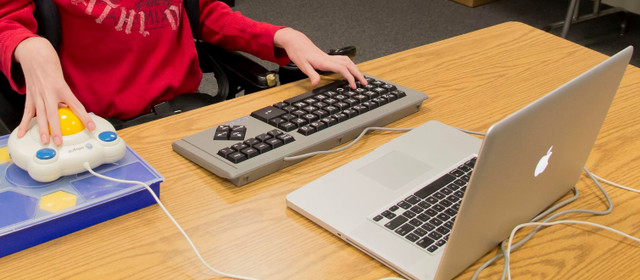
Mouse use can also be challenging for individuals with tremors. Using a large trackball mouse such as the Bigtrack Ball Mouse and adjusting mouse speed in your computer's settings can make mouse use much easier. Another option is to use Mouse Keys (again, a setting on your computer). This allows the cursor to be moved using the up and down arrows on the keyboard. And for individuals that choose to use mouse or mouse key input, consider using your computer's On Screen Keyboard instead of an actual keyboard. Additionally, try the free demo of Steady Mouse software to steady your mouse movements.

Individuals that have difficulty with mouse clicks can use a mouse with larger buttons, like the Bigtrack Ball Mouse shown below. It is available in a wireless version, too. Or they can use dwell click software that automatically clicks if the cursor is held in a location for a preset amount of time. Check out Dwell Clicker 2 for Windows or Dwell Click for Mac for this functionality.

For more information about Adaptive Computer Mouse and Handicapped Assistive Devices visit here Adaptive Tech Solutions

Monday, October 16, 2023

Latest Trends in Augmentative Communication Technology: What's New and Exciting


Adaptive Tech Solutions, a leading provider of augmentative communication devices and adaptive technology solutions, is excited to announce the release of their latest innovations in Augmentative and Alternative Communication (AAC) technology. These cutting-edge products are set to revolutionize the way individuals with communication challenges interact with the world around them.

Augmentative communication technology has come a long way in recent years, offering individuals with speech and language impairments new opportunities for self-expression and social interaction. Adaptive Tech Solutions is at the forefront of these advancements, continually pushing the boundaries of what AAC devices can achieve.

The company's latest offerings include state-of-the-art AAC devices equipped with advanced features to enhance communication for people of all ages and abilities. These devices incorporate the latest trends in augmentative communication technology, ensuring that users have access to the most effective and efficient means of expressing themselves.

Key highlights of Adaptive Tech Solutions' latest AAC devices:

  • Intuitive Touchscreen Interfaces: The new devices feature user-friendly touchscreen interfaces, making it easier than ever for individuals to select and communicate with words, phrases, and symbols.
  • Enhanced Speech Output: Adaptive Tech Solutions' AAC devices boast high-quality speech synthesis technology, ensuring clear and natural-sounding communication.
  • Customizable Vocabulary: Users can customize their device's vocabulary to suit their specific needs, empowering them to express themselves more effectively.
  • Integration with Mobile Devices: These devices seamlessly integrate with smartphones and tablets, allowing for enhanced communication and connectivity.
  • Robust Language Support: Adaptive Tech Solutions' AAC devices support multiple languages, enabling users from diverse linguistic backgrounds to communicate with ease.

"As a company dedicated to improving the lives of individuals with communication challenges, we are thrilled to introduce our latest augmentative communication technology solutions," "Our goal is to empower individuals with the tools they need to communicate effectively and engage with the world around them."

Augmentative communication devices have a profound impact on the lives of those who rely on them. Adaptive Tech Solutions continues to lead the industry by providing cutting-edge AAC devices that unlock new opportunities for communication and participation.

To learn more about the latest trends in augmentative communication technology and explore Adaptive Tech Solutions' innovative AAC devices, please visit their website at https://www.adaptivetechsolutions.com/cat-communication/.

About Adaptive Tech Solutions:

Adaptive Tech Solutions is a trusted provider of augmentative communication devices and adaptive technology solutions. With a commitment to enhancing the lives of individuals with communication challenges, the company offers a wide range of AAC devices and support services to help individuals express themselves and engage with the world.

For more information about Toys For Special Children and visit here Adaptive Tech Solutions

Tuesday, June 13, 2023

Computer Adaptations for People with Parkinson’s Disease


According to the National Parkinson’s Foundation, Parkinson’s Is second only to Alzheimer's as the most prevalent neurodegenerative disease in the United States. A diagnosis of Parkinson’s can lead to frustrating experiences while typing or using a computer mouse. There are, however, some adaptations and accessibility settings that can make these tasks much easier. These same accommodations can benefit those with tremors and diseases such as MS.

Keyboard Control

A common symptom of Parkinson’s is uncontrollable tremors. This results in extra keystrokes and difficulty with mouse control. In Windows, turning the Bounce Key function on will help to control the number of keystrokes made  when keys are pressed. This can be accomplished on Windows 7 or later by:

  • simultaneously clicking the ‘Windows logo Key’ + ‘U’ to reach the Ease of Access Center. (Or search ‘Ease of Access’ in the search bar.)
  • Selecting “Make the keyboard easier to use” under Explore All Settings.
  • Then selecting Turn Filter Keys on and choosing the options that you feel will best assist you with keyboard input.

Additional PC accessibility functions can be found here.

For Mac users, go to the accessibility settings to enable similar features such as Slow Keys. Find more details here and check out software that steadies the mouse and locks it onto targets, such as SteadyMouse.

Individuals with Parkinson’s may benefit from a keyboard with larger keys. Keyboards like the BigBlu Kinderboard Large Key Keyboard and the VisionBoard Large Key Wireless Keyboard have large 1” keys that make typing easier.

Both Mac and PC users can use their voice to navigate around their computer and type, too.

Mouse Control

Mouse use can also be challenging for individuals with tremors. Using a large trackball mouse such as the Bigtrack Ball Mouse and adjusting mouse speed in your computer's settings can make mouse use much easier. Another option is to use Mouse Keys (again, a setting on your computer). This allows the cursor to be moved using the up and down arrows on the keyboard. And for individuals that choose to use mouse or mouse key input, consider using your computer's On Screen Keyboard instead of an actual keyboard. Additionally, try the free demo of Steady Mouse software to steady your mouse movements.

Individuals that have difficulty with mouse clicks can use a mouse with larger buttons, like the Bigtrack Ball Mouse shown below. It is available in a wireless version, too. Or they can use dwell click software that automatically clicks if the cursor is held in a location for a preset amount of time. Check out Dwell Clicker 2 for Windows or Dwell Click for Mac for this functionality.

For more information about Adaptive Computer Mouse and Adaptive Technology Solutions visit Adaptive Tech Solutions.


Wednesday, August 10, 2022

Computer Adaptations for People with Parkinson’s Disease

As per the National Parkinson's Foundation, Parkinson's Is second just to Alzheimer's as the most predominant neurodegenerative illness in the United States. A finding of Parkinson's can prompt disappointing encounters while composing or utilizing a PC mouse. There are, notwithstanding, a few variations and openness settings that can make these errands a lot more straightforward. These equivalent facilities can help those with quakes and infections like MS.

Console Control

A typical side effect of Parkinson's is wild quakes. This outcome in additional keystrokes and trouble with mouse control. In Windows, turning the Bounce Key capability on will assist with controlling the number of keystrokes made when keys are squeezed. This can be achieved on Windows 7 or later by:

  • At the same time tapping the 'Windows logo Key' + 'U' to arrive at the Ease of Access Center. (Or on the other hand search 'Straightforward entry in the pursuit bar.)

  • Choosing "Make the console more straightforward to use" under Explore All Settings.
  • Then, at that point, choose Turn Filter Keys on and pick the choices that you feel will best help you with console input.

Extra PC openness capabilities can be seen here.

For Mac clients, go to the openness settings to empower comparative highlights like Slow Keys. Find more subtleties here and look at programming that steadies the mouse and locks it onto targets, like Steady Mouse.

People with Parkinson's might profit from a console with bigger keys. Consoles like the Big Blu Kinder board Large Key Keyboard and the Vision Board Large Key Wireless Keyboard have enormous 1" keys that make composing more straightforward.

Both Mac and PC clients can utilize their voice to explore around their PC and type, as well.

Mouse Control

Mouse use can likewise be trying for people with quakes. Utilizing a huge trackball mouse, for example, the Big track Ball Mouse, and changing mouse speed in your PC's settings can make mouse utilize a lot simpler. Another choice is to utilize Mouse Keys (once more, a setting on your PC). This permits the cursor to be moved to utilize the all-over bolts on the console. What's more, for people that decide to utilize mouse or mouse key information, think about utilizing your PC's On-Screen Keyboard rather than a real console. Furthermore, attempt the free demo of Steady Mouse programming to consistent your mouse developments.

People who experience issues with mouse snaps can utilize a mouse with bigger buttons, similar to the Big track Ball Mouse displayed underneath. It is accessible in a remote variant, as well. Or on the other hand, they can utilize stay click programming that consequently clicks assuming the cursor is held in an area for a preset measure of time. Look at Dwell Clicker 2 for Windows or Dwell Click for Mac for this usefulness.

For More Information About Adaptive Computer Mouse Visit Our Website: 

https://www.adaptivetechsolutions.com

Nite Brite Cuddles

Nite Brite Cuddles is an adorable plush bear that has been switch adapted to accept a standard 3.5mm switch (sold separately). Press and rel...