Thursday, November 9, 2023

Computer Adaptations for People with Parkinson’s Disease


According to the National Parkinson’s Foundation, Parkinson’s Is second only to Alzheimer's as the most prevalent neurodegenerative disease in the United States. A diagnosis of Parkinson’s can lead to frustrating experiences while typing or using a computer mouse. There are, however, some adaptations and accessibility settings that can make these tasks much easier. These same accommodations can benefit those with tremors and diseases such as MS.

Keyboard Control

A common symptom of Parkinson’s is uncontrollable tremors. This results in extra keystrokes and difficulty with mouse control. In Windows, turning the Bounce Key function on will help to control the number of keystrokes made  when keys are pressed. This can be accomplished on Windows 7 or later by:

  • simultaneously clicking the ‘Windows logo Key’ + ‘U’ to reach the Ease of Access Center. (Or search ‘Ease of Access’ in the search bar.)
  • Selecting “Make the keyboard easier to use” under Explore All Settings.
  • Then selecting Turn Filter Keys on and choosing the options that you feel will best assist you with keyboard input.

Additional PC accessibility functions can be found here.

For Mac users, go to the accessibility settings to enable similar features such as Slow Keys. Find more details here and check out software that steadies the mouse and locks it onto targets, such as SteadyMouse.

Individuals with Parkinson’s may benefit from a keyboard with larger keys. Keyboards like the BigBlu Kinderboard Large Key Keyboard and the VisionBoard Large Key Wireless Keyboard have large 1” keys that make typing easier.

Both Mac and PC users can use their voice to navigate around their computer and type, too.

Mouse Control

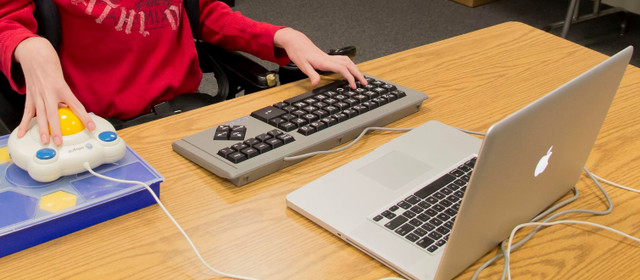
Mouse use can also be challenging for individuals with tremors. Using a large trackball mouse such as the Bigtrack Ball Mouse and adjusting mouse speed in your computer's settings can make mouse use much easier. Another option is to use Mouse Keys (again, a setting on your computer). This allows the cursor to be moved using the up and down arrows on the keyboard. And for individuals that choose to use mouse or mouse key input, consider using your computer's On Screen Keyboard instead of an actual keyboard. Additionally, try the free demo of Steady Mouse software to steady your mouse movements.

Individuals that have difficulty with mouse clicks can use a mouse with larger buttons, like the Bigtrack Ball Mouse shown below. It is available in a wireless version, too. Or they can use dwell click software that automatically clicks if the cursor is held in a location for a preset amount of time. Check out Dwell Clicker 2 for Windows or Dwell Click for Mac for this functionality.

For more information about Adaptive Computer Mouse and Handicapped Assistive Devices visit here Adaptive Tech Solutions

Monday, October 16, 2023

Latest Trends in Augmentative Communication Technology: What's New and Exciting


Adaptive Tech Solutions, a leading provider of augmentative communication devices and adaptive technology solutions, is excited to announce the release of their latest innovations in Augmentative and Alternative Communication (AAC) technology. These cutting-edge products are set to revolutionize the way individuals with communication challenges interact with the world around them.

Augmentative communication technology has come a long way in recent years, offering individuals with speech and language impairments new opportunities for self-expression and social interaction. Adaptive Tech Solutions is at the forefront of these advancements, continually pushing the boundaries of what AAC devices can achieve.

The company's latest offerings include state-of-the-art AAC devices equipped with advanced features to enhance communication for people of all ages and abilities. These devices incorporate the latest trends in augmentative communication technology, ensuring that users have access to the most effective and efficient means of expressing themselves.

Key highlights of Adaptive Tech Solutions' latest AAC devices:

  • Intuitive Touchscreen Interfaces: The new devices feature user-friendly touchscreen interfaces, making it easier than ever for individuals to select and communicate with words, phrases, and symbols.
  • Enhanced Speech Output: Adaptive Tech Solutions' AAC devices boast high-quality speech synthesis technology, ensuring clear and natural-sounding communication.
  • Customizable Vocabulary: Users can customize their device's vocabulary to suit their specific needs, empowering them to express themselves more effectively.
  • Integration with Mobile Devices: These devices seamlessly integrate with smartphones and tablets, allowing for enhanced communication and connectivity.
  • Robust Language Support: Adaptive Tech Solutions' AAC devices support multiple languages, enabling users from diverse linguistic backgrounds to communicate with ease.

"As a company dedicated to improving the lives of individuals with communication challenges, we are thrilled to introduce our latest augmentative communication technology solutions," "Our goal is to empower individuals with the tools they need to communicate effectively and engage with the world around them."

Augmentative communication devices have a profound impact on the lives of those who rely on them. Adaptive Tech Solutions continues to lead the industry by providing cutting-edge AAC devices that unlock new opportunities for communication and participation.

To learn more about the latest trends in augmentative communication technology and explore Adaptive Tech Solutions' innovative AAC devices, please visit their website at https://www.adaptivetechsolutions.com/cat-communication/.

About Adaptive Tech Solutions:

Adaptive Tech Solutions is a trusted provider of augmentative communication devices and adaptive technology solutions. With a commitment to enhancing the lives of individuals with communication challenges, the company offers a wide range of AAC devices and support services to help individuals express themselves and engage with the world.

For more information about Toys For Special Children and visit here Adaptive Tech Solutions

Sunday, June 25, 2023

Assistive Technology and Cerebral Palsy


Cerebral Palsy, the most common motor disorder, can make it difficult for people to interact with their environment. Through the use of assistive technology, such as switches and switch adapted toys/devices, people with Cerebral Palsy can independently interact with their environment. Switches are buttons, levers, or sensors that can be activated with any part of the body. Switches vary in how much pressure is required to activate them.

So, a person with very limited motor movements might do better with a Micro Switch, whereas a person with big, less controlled motor movements would do best with a large durable switch such as the Big Red Switch. Also, the body part being used to press the switch needs to be selected based on movements that are the most accurate, controlled, and consistent.

Individuals with Cerebral Palsy also often have speech disorders. For individuals with a significant speech impairment, they may not be easily understood by others. Through the use of communication devices (sometimes called talking boxes or talking buttons), people with speech impairments can communicate with others.

There are a wide variety of communication devices ranging from single message output devices such as the Talk About!, to more advanced devices with multiple messages/topic pages such as the SuperTalker, and high tech devices such as those offered by companies that specialize in speech generating devices, such as Tobii Dynavox and PRC. Some individuals who aren't quite ready for these devices might benefit from a low tech system such as the Talk n Tote Board, a portable communication board that can have pictures and objects attached. 

Adaptive Tech Solutions, a therapist owned company, offers a wide variety of switches and switch adapted toys/devices to promote independence in people with disabilities such as Cerebral Palsy.

Welcome to Adaptive Tech Solutions!

As you browse our website, you'll notice we're all about fun, learning, exploration, independence, competitive prices and taking awesome care of our customers! 

Adaptive Tech Solutions is a therapist owned and operated company and we strive to provide adapted equipment for individuals with disabilities at affordable prices. Our owner, Denise, has been a Speech-Language Pathologist and Assistive Technology Professional for over 30 years. She still actively works with folks with disabilities in her private practice and is happy to assist customers with product selection and in finding solutions to special situations. She also hand picks all the products we carry in our store and has the expertise to correctly advise how to use adaptive products.

For more information about Assistive Technology Devices and Adaptive Equipment for Adults visit Adaptive Tech Solutions


Tuesday, June 13, 2023

Computer Adaptations for People with Parkinson’s Disease


According to the National Parkinson’s Foundation, Parkinson’s Is second only to Alzheimer's as the most prevalent neurodegenerative disease in the United States. A diagnosis of Parkinson’s can lead to frustrating experiences while typing or using a computer mouse. There are, however, some adaptations and accessibility settings that can make these tasks much easier. These same accommodations can benefit those with tremors and diseases such as MS.

Keyboard Control

A common symptom of Parkinson’s is uncontrollable tremors. This results in extra keystrokes and difficulty with mouse control. In Windows, turning the Bounce Key function on will help to control the number of keystrokes made  when keys are pressed. This can be accomplished on Windows 7 or later by:

  • simultaneously clicking the ‘Windows logo Key’ + ‘U’ to reach the Ease of Access Center. (Or search ‘Ease of Access’ in the search bar.)
  • Selecting “Make the keyboard easier to use” under Explore All Settings.
  • Then selecting Turn Filter Keys on and choosing the options that you feel will best assist you with keyboard input.

Additional PC accessibility functions can be found here.

For Mac users, go to the accessibility settings to enable similar features such as Slow Keys. Find more details here and check out software that steadies the mouse and locks it onto targets, such as SteadyMouse.

Individuals with Parkinson’s may benefit from a keyboard with larger keys. Keyboards like the BigBlu Kinderboard Large Key Keyboard and the VisionBoard Large Key Wireless Keyboard have large 1” keys that make typing easier.

Both Mac and PC users can use their voice to navigate around their computer and type, too.

Mouse Control

Mouse use can also be challenging for individuals with tremors. Using a large trackball mouse such as the Bigtrack Ball Mouse and adjusting mouse speed in your computer's settings can make mouse use much easier. Another option is to use Mouse Keys (again, a setting on your computer). This allows the cursor to be moved using the up and down arrows on the keyboard. And for individuals that choose to use mouse or mouse key input, consider using your computer's On Screen Keyboard instead of an actual keyboard. Additionally, try the free demo of Steady Mouse software to steady your mouse movements.

Individuals that have difficulty with mouse clicks can use a mouse with larger buttons, like the Bigtrack Ball Mouse shown below. It is available in a wireless version, too. Or they can use dwell click software that automatically clicks if the cursor is held in a location for a preset amount of time. Check out Dwell Clicker 2 for Windows or Dwell Click for Mac for this functionality.

For more information about Adaptive Computer Mouse and Adaptive Technology Solutions visit Adaptive Tech Solutions.


Thursday, December 8, 2022

Alternative Communication Devices

Communication devices are also referred to in the field as AAC, SGD, augmentative communication, alternative communication. People also call them voice boxes, Talking Boxes, voice machines, voice buttons, talking buttons, speech devices. Regardless of what you call them, they are devices that help people with poor speech or no speech communicate their wants and needs.

GoTalk Fit

An easy-to-use 4 or 9 message voice output device. Activate the easy on/off switch and begin to record messages on each of 3 levels for a total of 12 or 27 messages in this small handheld device. Each level is designated by a different color LED and while switching modes occurs by holding in the Record Mode and listening for the auditory single beep to indicate the 4 message mode or two beeps to indicate 9 message mode. A powerful communication device that's hand-held for quick access. The plastic cover makes it perfect to toss into a purse, bag, or pocket without the buttons accidentally being pressed.

iTalk4

Activate the colored top to play the desired message. New messages are easily and quickly recorded to the iTalk4 on the fly, or use the levels to pre-record up to three sets of messages ahead of time. Includes 4 clear snap covers to attach picture symbols.

GoTalk 32 Stand

It's machined from expanded vinyl, so it's lightweight and durable. Includes non-skid rubber feet to prevent unintentional movement. Ideal for direct select or scanning users. Folds flat for easy transport or storage.

Vinyl Picture Pockets

High-quality clear vinyl pocket with re-positionable and reusable adhesive backing. These are a heavy 8-gauge (8 mil) clear material on the front with a 6-gauge adhesive back to reduce wrinkling and curling.

Attainment Talker

The AT24 has 24 messages with (¾-inch) active message areas. Touch each active area to play back recordings. To increase the active area size and decrease the number of messages, simply record the same message in multiple areas. By grouping 4 message squares together and recording the same message on all 4 areas, you can create 6 larger active areas. Then place a larger picture over each of the grouped 4 message squares.

For more details about Augmentative Communication Devices Please visit our website: https://www.adaptivetechsolutions.com/

Thursday, November 3, 2022

Switch Adapted Toys For special Children

Our switch adapted toys are adapted to allow individuals with physical disabilities the opportunity to play and learn as independently as possible. With the use of a switch, a person with disabilities can be an active participant in fun, meaningful accessible activities. Our adapted toys and switches are interchangeable and compatible with most toys and switches sold by other companies. Our goal is to provide affordable switch Adapted Toys  that teach social skills, cause & effect, language, and sensory awareness through playing and interacting with the environmet

  • Pitching Machine

This pitching machine  is the perfect way for people with limited hand use to play ball with a pet or a friend, or to play lawn or target games.  It has been adapted to accept a standard 3.5mm switch (sold separately). It also will work without a switch. When using a switch, the user will need to hold down their switch for about 11 seconds for the pitch to occur. Continuing to hold their switch after this first pitch will result in additional pitches about every 7 seconds until their switch is released or all the balls are used. A flashing red indicator light shows when the ball pitches, making it easy to prepare for the oncoming ball. Has three different adjustment angles. Includes 6 aero strike balls that are 2 3/4"  in diamater

  • Dance and Play Elmo & Tango

Press your switch or Press Elmo’s foot for Elmo & Tango to dance together & play. Each character takes turns and then play together (what a great way to demonstrate how friends take turns, how they play together...). They sing three different songs. Press your switch or Elmo's foot to start the duo. Press again to stop. Absolutely adorable. You have to look at the video!

  •  Minnie Roadster RC Car

You'll have so much fun with this Minnie Roadster Remote Controlled car. This toy has been adapted for use with one or two 3.5mm switches, sold separately (use 2 switches for full control of the toy), or it can be activated with the built in buttons on the remote. Press and hold one switch to go straight. Press and hold your other switch to turn. A fun way to work on visual tracking! Requires 3 AA and 2 AAA alkaline batteries, not included. Runs best on smooth surfaces. Both this toy and the Mickey version run on the same frequency, so they cannot be used in the same proximity. SMALL PARTS: Not recommended for children under the age of 3.

  • Boppin Beaver

Boppin' Beaver Linkimal has bright lights and 25+ songs, sounds and phrases teach shapes, counting and colors  while stimulating visual and auditory senses. He has been switch adapted to accept a standard 3.5mm switch (sold separately). Press and release your switch (or push the beaver's head) to start the action. Press it again to move forward to the next activity.  Uses 3 AAA batteries (included). Measuring just 6" tall x 4" wide, this toy is a great portable take along! Recommended age 9 months +.

Explore More Switch Adapted Toys For special Children Please visit us:

https://www.adaptivetechsolutions.com

Saturday, October 8, 2022

Assistive Technology and Cerebral Palsy

 Cerebral Palsy, the most common motor disorder, can make it difficult for people to interact with their environment. Through the use of assistive technology, such as  switches and switch adapted toys/devices, people with Cerebral Palsy can independently interact with their environment. Switches are buttons, levers, or sensors that can be activated with any part of the body. Switches vary in how much pressure is required to activate them. So, a person with very limited motor movements might do better with a Micro Switch, whereas a person with big, less controlled motor movements would do best with a large durable switch such as the Big Red Switch. Also, the body part being used to press the switch needs to be selected based on movements that are the most accurate, controlled, and consistent.

Individuals with Cerebral Palsy also often have speech disorders. For individuals with a significant speech impairment, they may not be easily understood by others. Through the use of communication devices (sometimes called talking boxes or talking buttons), people with speech impairments can communicate with others. There are a wide variety of communication devices ranging from single message output devices such as the Talk About!, to more advanced devices with multiple messages/topic pages such as the SuperTalker, and high tech devices such as those offered by companies that specialize in speech generating devices, such as Tobii Dynavox and PRC. Some individuals who aren't quite ready for these devices might benefit from a low tech system such as the Talk n Tote Board, a portable communication board that can have pictures and objects attached. 

Adaptive Tech Solutions, a therapist owned company, offers a wide variety of switches and switch adapted toys/devices to promote independence in people with disabilities such as Cerebral Palsy.

Nite Brite Cuddles

Nite Brite Cuddles is an adorable plush bear that has been switch adapted to accept a standard 3.5mm switch (sold separately). Press and rel...